Redaction that actually deletes.

Most "redacted" PDFs still have the text sitting under the black box — copy‑paste and it's back. BlackBar rasterizes every page, so the words are physically gone. And your file never leaves your browser.

100% offline — nothing uploaded Text destroyed, not covered Auto‑detects SSNs, cards & more No account, no subscription
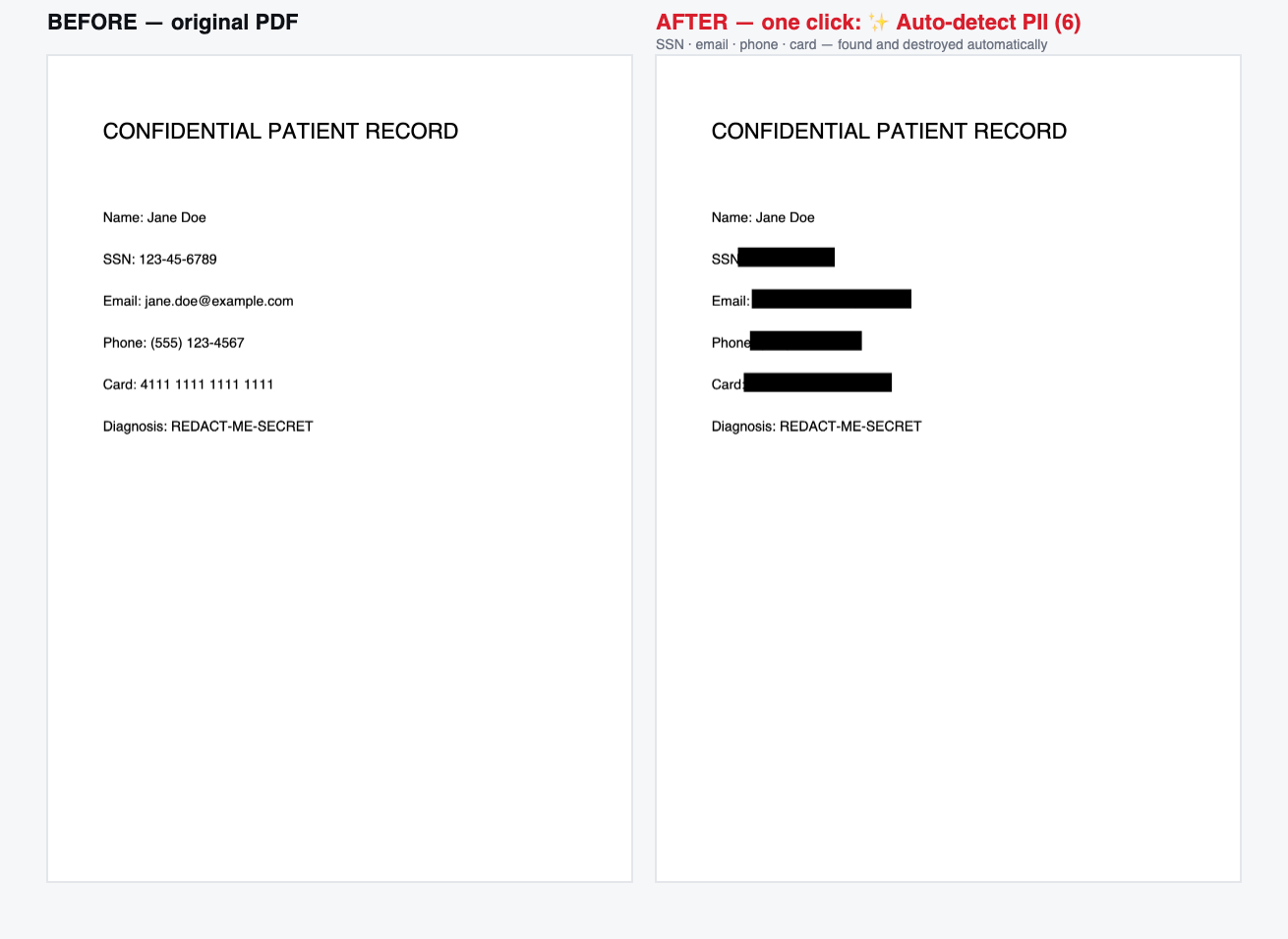
Before and after: a PDF with SSN, email, phone and card number, all auto-detected and blacked out

One click — Auto‑detect finds and destroys every SSN, email, phone and card number.

The black box is lying to you.

Drawing a black rectangle in Acrobat or Preview doesn't remove the text — it just hides it. Courts, law firms and government agencies have leaked redacted documents this way for years.

Ordinary "redaction"

The text is still there, underneath the box. Select‑all → copy → paste and the "hidden" name, SSN or figure comes straight back out. Automated tools scrape it in seconds.

BlackBar

Each page is rasterized to a flat image with the redactions burned in. The output PDF has no text layer at all — there is nothing left under the box to recover.

Three steps. Zero uploads.

1

Drop your PDF

It opens in your browser. Nothing is sent to a server — processing happens entirely on your device.

2

Redact

Drag boxes by hand, click Auto‑detect to catch every SSN/card/email, or type a name to redact every occurrence at once.

3

Download

Get a flattened PDF with the text permanently gone — plus an optional audit certificate of what was removed.

Everything you need to redact with confidence.

🗑️

True redaction

Pages are rasterized so redacted text is destroyed, not hidden. Verified: zero recoverable text under the box.

Auto‑detect PII

One click finds every SSN, email, phone, credit card (Luhn‑checked), IBAN, IP, and AU tax/Medicare number.

🔎

Find & redact

Type a name, case number or account ID and black out every occurrence across the whole document at once.

Batch mode Pro

Drop a stack of PDFs, auto‑redact them all, and download one ZIP — with a manifest of every file processed.

📄

Audit certificate

Download a signed‑off log of what was redacted, when, and by what method — for your compliance trail.

🔒

100% offline

No upload, no account, no network calls. The whole app is one file you can run with your Wi‑Fi switched off.

Your document never leaves your computer.

Redaction tools that upload your file are asking you to trust a stranger's server with your most sensitive documents. BlackBar can't leak them, because it never sends them anywhere.

Try it now — free

Get the Pro launch & updates.

The redactor is free to use right now. Drop your email and we'll tell you the moment Pro (batch, all-pages, certificates) is live — and send new features as they ship. No spam.

Would you pay $29 for this? Hit reply on the first email and tell us — it genuinely decides what we build next.

Simple, one‑time pricing.

No subscription. Buy it once, it works forever — even offline.

Free

$0
  • Unlimited manual + auto redaction
  • First 2 pages per document
  • Subtle BlackBar watermark
Start free
BEST VALUE

Pro

$29 one‑time
  • Every page, no watermark
  • Batch mode — many PDFs at once
  • Audit certificates & manifests
  • Works forever, fully offline
Get Pro

Questions, answered.

Is my document really never uploaded?

Correct. BlackBar runs entirely in your browser using local JavaScript. There is no server to send anything to — you can literally disconnect from the internet and it still works.

How is this different from a black box in Acrobat?

A black box in most editors is drawn on top of the text, which stays selectable underneath. BlackBar rasterizes the whole page to an image, so the output PDF contains no text layer at all — the redacted content is gone, not hidden.

What can Auto‑detect find?

Social Security numbers, email addresses, phone numbers, credit‑card numbers (validated with the Luhn checksum so it doesn't flag random order numbers), bank IBANs, IP addresses, and Australian tax file & Medicare numbers.

Does it work on scanned PDFs?

Auto‑detect and Find need a text layer, so on a pure scan they won't find text automatically — but you can still draw redaction boxes by hand, and the output is fully flattened. Automatic OCR for scans is on the roadmap.

What do I actually get with Pro?

All pages (Free covers the first two), no watermark, batch processing of many files into one ZIP, and downloadable audit certificates. It's a one‑time $29 — no subscription.